
This article was updated Thursday, November 19, 2026
Have you found music on your Spotify artist profile that isn’t yours? A metadata mix-up, an artist with the same name, or an unauthorized, fraudulent upload can confuse fans and impact the stats and recommendations associated with your profile.
KEY TAKEAWAYS:
- Spotify Artist Profile Protection is an optional setting that allows you to prevent releases that aren’t yours from appearing on your profile. The tool is now available to all artists.
- With Artist Profile Protection on, Spotify emails you every time a release is delivered in your name. If the release is not yours, you can decline it. If you do not take action, the release automatically goes live, but you can remove it up to 28 days after it appears on your profile.
- Removing yourself on Spotify doesn’t fix the release on other platforms. Report the release to other platforms as necessary and contact your distributor if you need help.
How does music show up on the wrong Spotify profile?
Sometimes Spotify links a release to the wrong artist profile because two artists have the same or similar names, or because of a metadata issue. In other cases, bad actors attach a release to an artist profile without permission.
CD Baby delivers music to platforms using the information submitted with each release. Once a release has been delivered, the platform controls how it’s linked to an artist page. According to Spotify, the rise in AI slop is making this problem worse. That’s why the platform has introduced a new tool that gives artists more control over what music appears on their profile.
What is the Spotify Artist Profile protection tool?
Spotify’s “Artist Profile Protection” notifies you when music is delivered to your artist profile and lets you approve or reject releases before they go live.
At CD Baby, we distribute music to partner platforms and help artists manage their releases. Spotify’s Artist Profile Protection gives artists another way to manage what appears under their name on Spotify.
How does it work?
You can turn on Artist Profile Protection in Spotify for Artists. On a desktop, look for it in the menu under your avatar; in the mobile app, go to the Music page and open Review. Artist team admins and editors can also manage this setting. Once it’s on, Spotify emails you when music is delivered with your name attached.
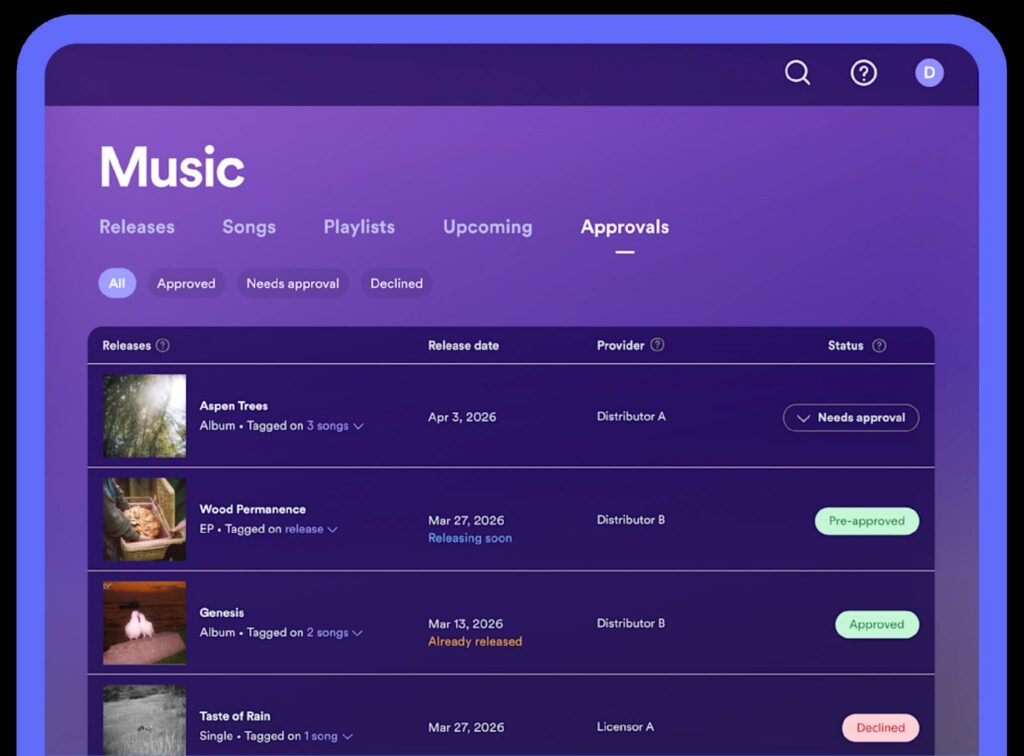
The default setting is Review releases. You can check releases in Music > Review and remove yourself from eligible releases that aren’t yours. If you take no action, the release goes live as scheduled with you listed as an artist. You can still take action for up to 28 days after it goes live.
Spotify is also testing an advanced setting “Block Releases,” which automatically blocks releases from going live on your profile until you approve them — a great tool for artists prone to frequent mismatches.
How do I respond to a mismatched or unauthorized release?
Here’s how to use the Artist Profile Protection feature to prevent misattributed releases from showing up on your profile.
- Keep an eye on your email: Once Artist Profile Protection is on, Spotify sends you an email when a release is delivered in your name.
- Review the release: Open the release in Spotify for Artists and navigate to the Review tab. If you’re using the “Block Releases” setting, go to Approvals.
- Decline the release: Select Remove next to any release that isn’t yours. With “Block Releases,” on, select Decline.
- Report to Spotify: If you’re in need of further assistance or noticing repeated misattributed releases, report the issue to Spotify and notify your distributor.
- Check other platforms: A mismatched release might have been delivered to other platforms. Removing your release on Spotify does not remove it from other platforms. Check your profiles across platforms and reach out to your distributor for more assistance. CD Baby artists can find more information here.
Next steps
Artist Profile Protection can help you respond when an unfamiliar release is linked to your Spotify profile. Turn it on, check releases when Spotify notifies you, and report mismatches or unauthorized uploads on each platform where it appears.
If you’re looking to get your music on Spotify, CD Baby is a preferred provider. We deliver your music to Spotify’s requirements and make it easy to claim your Spotify for Artists profile where you can access tools like Artist Profile Protection and more. Create a free account with CD Baby today and pay once per release with no annual fees.