
Why does cover art matter?
Your cover art is often the very first thing people notice about your music. Whether they’re browsing on a streaming platform or picking up a physical release, it creates a powerful first impression. It’s also the visual expression of your music — representing its themes, emotions, and experiences in another medium. That’s why cover art is one of the most important elements of any release.
But it’s also one of the most common reasons releases get delayed or rejected. Streaming platforms like Spotify and Apple Music have strict artwork requirements that can lead to delays and rejections if you don’t follow them.
In this blog, you’ll learn best practices for creating cover art — from essential technical guidelines to tips for designing a visual that captures attention and represents your music.

What are streaming platform requirements for cover art?
Streaming platforms have requirements for the design, content, and file formatting of your cover art. These rules serve multiple purposes – from ensuring your artwork renders correctly to protecting against copyright infringement. In this section, you’ll learn everything you need to know to successfully upload your cover art.
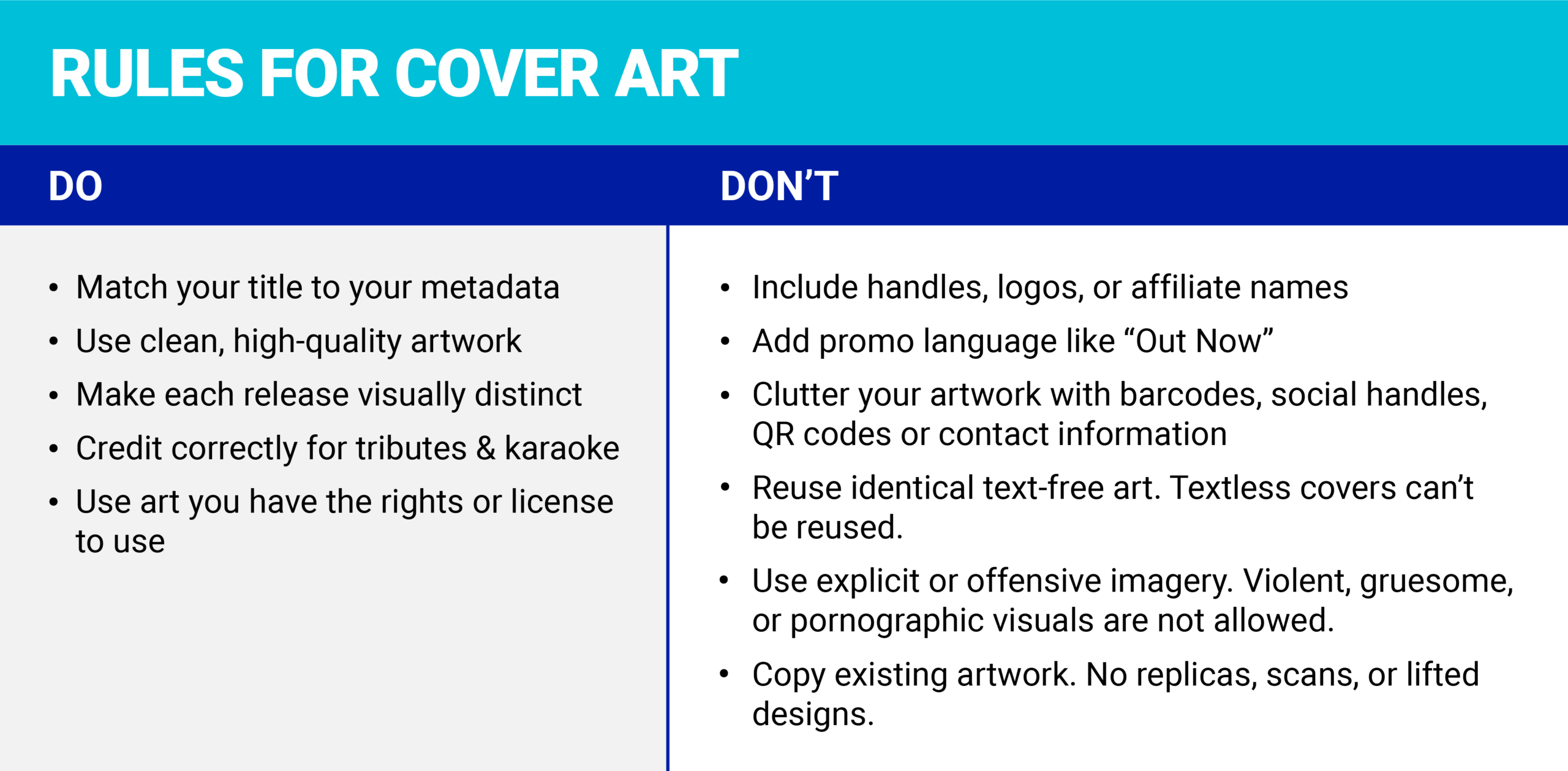
What not to include in your cover art:
Let’s start with what to avoid in your artwork. Cover art should not include affiliate names or logos (such as labels or sponsors), contact information or social media handles, advertising or promotional language, references to timing or availability (e.g., “Brand new,” “Just released,” or “Available on Spotify/Apple Music”), UPC barcodes, QR codes or mentions of product formats like CD, vinyl, or digital single.
When it comes to imagery, avoid offensive or explicit content. Your artwork should also be high quality — free of compression artifacts, white space, blurred or cut-off elements, scanned stickers, or excessive and irrelevant text.
What you may include in your cover art:
With the common pitfalls out of the way, here’s what’s permissible. Your cover art may use any casing as long as the title matches the way you typed your title in your submission. But be careful with all-caps or random capitalization — streaming platforms may display your typed title differently from your cover art.
If you’re releasing a tribute or a set of karaoke tracks, you can reference the original artist, but your artist name must appear more prominently and specify it’s a tribute. (e.g., “[Your artist name] tribute to [original artist]” or “Originally performed by [original artist]”).
Lastly, public domain and stock images are also allowed, but you must follow their usage guidelines and be prepared to provide proof of rights if requested.
How should I format my cover art for distribution?
If you’re uploading music with CD Baby, review your cover art to ensure it follows these guidelines.
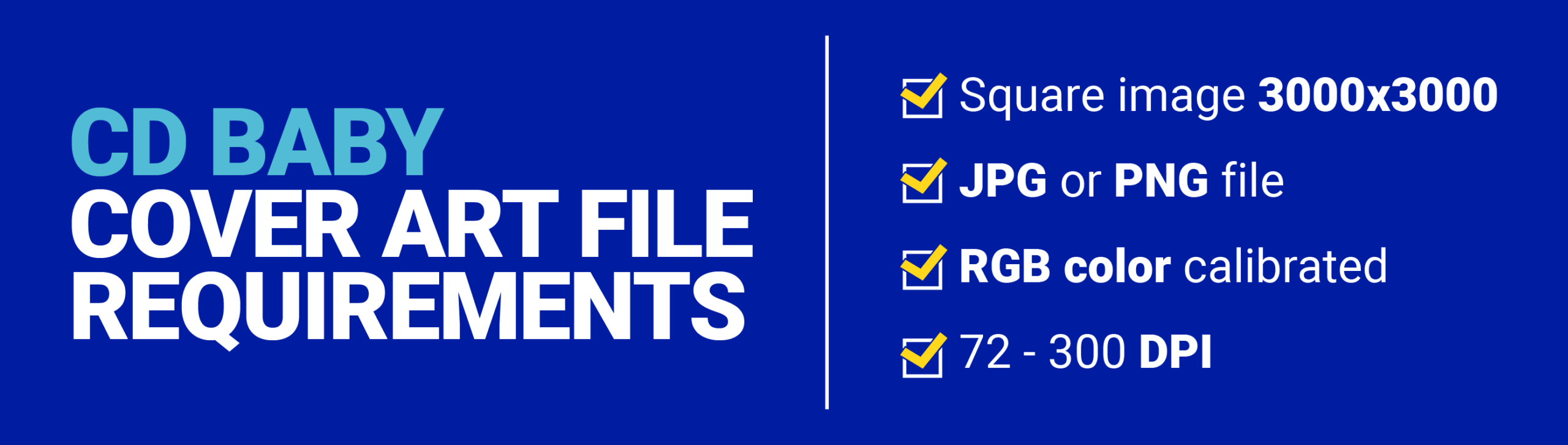
Image must be square (3000×3000)
It’s always better to have art that is too large than too small. Remember that you can scale down a large image without distorting it, but scaling up a small image will make it look blurry and pixelated
Format in JPG, PNG, GIF, or JPEG
Provide your artwork in the proper file format. Changing the file name after the period will not change the format.
Color calibrate to RGB
Ensure your image is color calibrated to RGB — if in Photoshop; no CMYK or uncalibrated image files
Tip: Open a .png in Paint and save as a .jpg and it will automatically convert to RGB.
72 – 300 DPI
Give your cover art sufficient resolution to ensure it presents well across streaming platforms
Tip: 300 DPI is optimal for your cover art
What are some key considerations for designing my cover art?
Your cover art is an opportunity to synthesize your music into a visual statement. As you’re brainstorming your artwork, consider recurring themes across your songs and how they relate to your identity and brand as an artist. This doesn’t have to be a systematic process — art rarely is — but think about images, ideas, and moments within your music that capture its mood and themes well. Here’s what to consider when creating your cover art!
Tip: Send your music to a friend and ask them to send back notes on any visuals, ideas, and moods your music evokes. Use those as starting points for brainstorming your art.
Title of Your Work
Although it’s not required, we recommend including your artist name and the title of your release on your cover art. It’s helpful for listeners who might encounter your album cover out of context.
Tip: If you choose to include your name and title on your cover art, your artist name and title must match exactly the name and title you entered into your metadata for submission.
Discrepancies between cover art and metadata can cause your submission to be rejected.
Typography
When deciding on a font to display your artist name and the title of your work, consider how the style of a text aligns with the textures, themes, and moods of your music. For example, darker, serious albums may warrant a heavier, bolded or serif font, while poppy, upbeat music might have a lighter, more playful font.
Color palette
Ahead of selecting imagery for your artwork, note any colors you associate with your songs and artist identity. Short of creating exact colorways, you can note the moods and energy of your music to steer in the right direction.
Imagery
Imagery, the most important part of your cover art! With so many options from photography to fingerpaints, a good starting point is assessing your capabilities and network, and gauging from there. Assuming you have a creative direction for the album, you can do it yourself, hire a design agency, or recruit a friend.
Before uploading your cover art for distribution, optimize your artwork across multiple sizes and platforms. In today’s digital world, your cover art must translate from a small thumbnail on a phone to the full screen of a laptop.
And remember, just as with your music, you must obtain permission to use any artistic works that aren’t your own.
What makes a good cover?
A great cover should look the way your music sounds. You can translate your music into a compelling visual by aligning the typography, colors, and imagery with the emotions your music creates. As you experiment with each of these elements, aim for a final composition that presents well across formats (digital and physical) and demands a fan’s attention.

Conclusion
From brainstorming your cover art to preparing it for distribution, keep this guide handy to reach new listeners and make a strong first impression.
When you’re ready to release your music, CD Baby offers distribution to over 150 streaming platforms worldwide — with no annual fees. Create a free account today.