
Creating Sheet Music for Your Tunes

September 16, 2011{ 28 Comments }

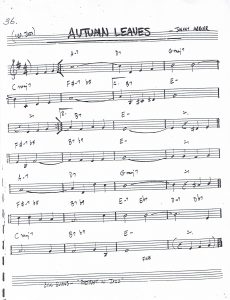
Autumn Leaves Leadsheet 230x300 Creating Sheet Music for Your TunesWhether you’re looking for a promotional tool, an additional revenue stream, a way to make practice or gigs easier on the band, or just a gift for fans, you might want to think about having sheet music available for your tunes.

Sheet music comes in different forms

1. Lead sheets- Lead sheets, as found in Fake Books, give musicians a general outline of the most important elements of a piece (melody, lyrics, rhythm, and chords). These charts are good for any setting where musicians are expected to bring their own interpretive skill to the table, or where the song is familiar enough that this basic guide triggers musical muscle memory to then replicate an existing arrangement.

2. Chord charts- There are a few different types of chord charts, but for this discussion we’re talking about a simple lyric sheet with chord names or symbols written along with the words. The type of thing you’d want to have at a campfire singalong, and hope that the campers remember the melody!

3. Score- Most common in Classical music, a score conveys exact musical notation for a particular arrangement of a piece.

4. The “part chart”- This a term I use to describe sheet music that is close to a lead sheet, in terms of chordal, rhythmic, and lyrical information, but where the melody notated is for someone other than the lead instrument or vocal. My band had a steady lineup of drums, bass, keys, guitar, and vocals. We all knew the songs by heart. But we’d also frequently have additional members join us on trumpet, saxophone, clarinet, and viola. In those cases, it helped to have charts with each person’s part notated. That way, we wouldn’t have to waste a lot of time re-assigning parts in practice or leaving gigs to guesswork.

basic notation 650x123 Creating Sheet Music for Your Tunes

How you can use sheet music

1. Sell it!- In Episode #55 of CD Baby’s DIY Musician Podcast, David Nevue talked about how he offers downloadable PDFs of his sheet music on his website. If you play original music (especially piano music) in a Classical, Avant-Garde, New Age, or Jazz style, people may be interested in purchasing PDF scores.

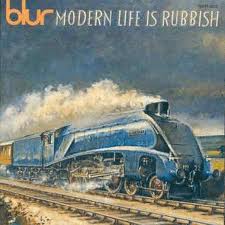
2. Promote! Making chord charts or lead sheets available for free from your website (or bundled with CDs) can be a great way to spread the tunes. Any 12 year-old guitar student would be psyched to buy an album that came with chord charts. I remember when Blur’s Modern Life is Rubbish album came out, it had chords listed above the lyrics in the CD booklet. I played Blur tunes at parties for the next 3 months.
 Creating Sheet Music for Your Tunes

Also, a friend of mine, James M. Gregg, recently released an album (full disclosure: that I helped produce) funded through a Kickstarter campaign. Middle-tier contributors were rewarded with a bonus package that included home demos of the tunes, a collection of behind-the-scenes essays on writing and recording each song, and the accompanying sheet music! For diehard fans, this was a great way to get new insight into the creative process.

3. Performance and practice. As I mentioned above, having sheet music prepared in advance for practices and gigs can make everyone’s life easier. You don’t have to worry about mid-gig memory loss, and skilled sight-readers won’t hate you for making them do all their own prep-work.
27554 124712594209197 7255 n Creating Sheet Music for Your Tunes

Simple ways to create sheet music

You don’t have to be Mozart to “score” your song. In fact, most of you could probably create a simple lyric/chord chart for your songs right now. Creating lead sheets is a bit more advanced, but can still be done  with some degree of ease if you use a program like Sibelius First or Finale PrintMusic. Many programs allow a MIDI hookup too, so you can play your music via keyboard or guitar and have the computer do the transcription work.

Digital Sheet Music Readers

Devices like the iPad are making things easier for gigging musicians. They no longer need to lug around a dozen overstuffed folders of sheet music. Now they can load sheet music files onto their tablet, sort and order the charts accordingly, and forget about clothes-pinning the paper to their music stands at outdoor gigs!

Check out these app reviews for the best iPad sheet music readers.

Do you have any advice or horror stories about creating, using, and reading sheet music? Let us know in the comments section below.

-Chris R. at CD Baby

Sell your music on iTunes in as little as 48 hours!


  • Rachel_leclerc

    So interested in learning about this!. Thanks for the info.

  • http://www.Lthrboots.com Jerry Jones

    Good ideas for using sheet music. I have checked out Sibelius and Finale, and will most likely try to get one of them….but they are super expensive, so that will have to wait.

    If someone has a link for an affordable sheet music program, please post it. Us musicians are starving, remember…..and we can’t afford $500.00 just to print out sheet music.

    • http://members.cdbaby.com CD Baby Admin

      I think both of those programs have a kind of entry-level, basic features version that is cheaper.

    • Woodamand

      I use Musescore all the time – open source, cross platform, works great and of course its FREE.

    • Woodamand

      I use Musescore all the time – open source, cross platform, works great and of course its FREE.

  • http://members.cdbaby.com CD Baby Admin

    No more chickenscratch charts? But those are so fun to read!

  • http://members.cdbaby.com CD Baby Admin

    Thanks for the tech tip. I haven’t played around with too many programs besides Sibelius, so good to know.

  • http://members.cdbaby.com CD Baby Admin

    Great to know. Thanks for sharing the info.

  • http://www.blguitars.net Blguitars

    I use Overture from GenieSoft. I found the learning curve to be a lot easier than Finale.

  • Anonymous

    After recording two Celtic Fiddle CDs containing a lot of my own tunes, I received many requests for the sheet music. Because they were all in my head I realized I needed to get them written down if only to preserve them. It was a big job jotting down all the rythms for 40 tunes and then I bought Print Finale. It was reasonably priced and fairly easy to understand how to get the music printed out in proper format. However it did not record and write out the correct notes by me playing my fiddle, which it was supposed to do, and had to be manually done. In the end I created a beautiful book of my music called – “Kierah-Original West Coast Fiddle Music” which can be bought from my website or at any music store in Western Canada. http://www.irishmadness.com

  • Anonymous

    As someone who makes a living producing sheet music in every format, and as a musician, I can say with confidence that having charts/sheet music is still a powerful way to get your music out there.

    It’s unique. It finds its way into markets and demographics you never thought your music could reach. – Joe Eglash

  • http://www.facebook.com/christopher.bingham1 Christopher Bingham

    I found watching their videos really helped. We have a string trio in our band and it’s priceless!

    One thing that I’ve found is that almost everything flowes from the “create” drop down. The other thing is they use British terms for dynamic markings, so there is a learning curve there. “Hairpin” for crescendo is one example. Good luck with it – I found Sibelius to be the intuitive one for me. You should see the learning cliff you need for Gigastudio. There was $500 down the drain!

  • Tim

    I use Notion for scoring my band’s stuff. It’s around the $300 range but it uses samples of real instruments rather than MIDI so you can get a much more realistic idea of how the piece will sound.

    Not 100% real sounding but the closest I’ve ever heard (outside of spending $800 on sample patches elsewhere)

    Also, ignore their demo song, it’s terribly written

  • Destroynateallen

    Great blog. I’ve included lyrics and chords with each of my 6 full lengths. It’s been a great way to connect with fans.

    Keep up the good work.

    Nate

    http://www.destroynateallen.com

    • http://members.cdbaby.com CD Baby Admin

      Cool. Do you just put chord markings above the lyrics in your CD booklet?

  • http://members.cdbaby.com CD Baby Admin

    Haha. Hello, David. Google Alerts must be working! Hope you’re doing well.

  • http://twitter.com/UkuleleJim Jim Clark

    Have a look at http://www.gochords.com. It’s easy and free for creating tabs.

  • Mark Boucher

    I started writing my own songs in July of 07 and found my self preforming on (open mic) stage the next summer. I had six songs to do, three I knew (kinda) and the other three I needed to have a glance or two at the lyrics. The stage was made from a large truck flatbed. The stage was located in the grass in front of bleachers inside a football field. (can ya tell where this is going?)
    They told me if ya have music, ya better bring some clothespin’s because it gets very windy! No sooner than I started playing the clothespins flew about ten feet and my song book looked like a card shark was shuffling it!
    I spent all summer learning my tunes and now have over an hour set memorised. And now I’ll qoute Mr Dylan…”I’ll know my song well before I start singing…”
    I type out all my lyrics by hand and put the proper chord’s in a space between the lyrics. I like to type it my self, sometimes it’s good to slow down, and sometimes I’ll improve the tune as it’s being typed. Also I have to learn it, so why not type it!

  • http://www.facebook.com/dolph.amick Dolph Amick

    Brilliant ideas! I’m definitely gonna put some of our sheet music on our website. I write rock-type tunes with madrigal-type harmonies for my band, Three Quarter Ale, as well as composing music for local theatres, so I’ve found more and more that for me, really scoring things out completely from the start (in Sibelius in my case) is super-helpful for several reasons:

    1. Memory. When we go back to the tunes after a year of not playing one, a formal score is invaluable. Many times have I scribbled down lyrics and a chord chart, only to forget the melody; plus, we frequently find that we’ve altered some notes in performance, and if it’s written down, no one can protest whether it’s right or wrong (whether or not we go back to the original way or not).

    2. I can export MIDI files from the scoring program to quickly build up any sampled or synthesized tracks that I might record later, even if just for demos or learning tools. I can also easily email the MIDI files to others.

    3. If there are other musicians involved, I can easily email pdf files of the music before a recording date. My bandmates and I have iPads (we were lucky enough to win them), so I always email a version formatted for those screens as well.

    4. For complex vocal arrangements, even with great singers, learning it all by ear doesn’t always work well (or quickly). “Can you sing it for me again?” It’s so helpful to have it as another resource for communicating how a song goes.

    5. I find I really don’t write melodies as well sometimes when I write with my guitar, as I tend to go where my fingers feel good as opposed to what makes musical sense. The guitar part may rock, but often my melodies come out being very bland and monotonous. When I write on the computer, I actually sit and just sing to myself and then figure out what I sang, which seems to make the vocal lines more interesting and organic. I think Billy Corgan once said he wrote rockers on the guitar, groovers on the bass, and lyrical songs on the piano.

    6. It looks a little more professional, maybe? I’m perfectly content to play off a chart that someone jotted down, but there’s no doubt that a good score can communicate a lot more information.

    …and actually, that leads to my one big suggestion in creating sheet music. In bringing music in to my band as I’ve learned how to use notation software: be prepared to invest some time at the end of creating each score into cleaning it up and making it easier to read.

    Make sure it’s big enough on the page. Make sure lyrics are spaced far enough away from notes to read easily. Make sure multiple endings or diverging harmony parts can be followed reasonably on the page. Eliminate unneeded measures or instruments from everyone’s parts so that they don’t have to leaf through (or print out!) 25 pages for a 30-second song. Conversely, if there’s a critical musical cue in another part(like a guitar lick or something), make sure that appears on vocal scores as a helpful guide. Put any marks on the score that will help YOU in practice as well (I always put chord symbols above the staff, because when we’re rehearsing the music, it’s usually new to me too).

    …Sorry I went on and on. :P

    • http://members.cdbaby.com CD Baby Admin

      Oh yeah. Good call on the font sizes and such. Charts with tiny writing are about as useful as no chart at all. Madrigal rock sounds sweet!

  • Rose Tait

    At every Jazz Jam Session you’ll see the iRB App (iRealBook) on musician’s iPhones and iPads, with the chord charts for many jazz standards, easy to transpose to any key.

    I use this App also with the iRealBook Web Editor, both to write new songs and to customise standards. And you can then pay it through speakers in many styles, Jazz, Latin, Pop, each with a dozen options, at any tempo, at any pitch, as a brilliant rehearsal tool.

  • Steve

    Guitar Pro 5 Tablature is great… easy, easy, easy… minimal learning curve. All this for under $50… and they have a good support team. Every one should check these guys out.

  • http://members.cdbaby.com CD Baby Admin

    We’ve looked into sheet music eBooks for BookBaby, but they are, like you said, problematic. Since all the content has to flow on eReaders, charts aren’t really practical in that format. The iPad apps are pretty great, though, as far as displaying charts.

  • Teresavu

    My husband and I have 60 songs completed with sheet music/ chords ect.. as well as the 5 professionally produced CDs .You are invited to visit our website at http://www.teresaofsong.com for free listening and download.

  • http://members.cdbaby.com CD Baby Admin

    What about just making the zine a simple PDF?

  • http://www.brendagrossandthreeinonemusic.com Brenda Gross

    I was contacted Friday by a band in California asking to perform one of my songs “Free To Live” for a Veterans Memorial Museum that was opening in Thousand Oaks California on Sunday….since I live in Spokane, getting lead sheets and chord charts to them overnight would have been impossible….since I have them linked in on my website..the band leader gave all of the band and singers my website address…each member was able to access and print their documents at home and bring them to the first rehearsal Saturday…here’s the time line…they got the call to perform Friday, practiced “Free To Live” on Saturday, performed it on Sunday without any delays…I received several texts, emails, etc. from the band and singers on how this made their day and how it was possible for “Free To Live” to be performed on the short notice….my website address is http://www.brendagrossandthreeinonemusic.com under the MUSIC VIDEO page FREE TO LIVE if you would like to see…

    • http://members.cdbaby.com CD Baby Admin

      That is awesome! Thanks for sharing the story.

  • http://www.facebook.com/bob.lanctot Bob Lanctot

    I’m curious how you turn the pages on an iPad whilst playing your instrument. Might be okay for some instruments but I play bass and don’t have the luxury of many rests where I can turn a page. At least with paper and assorted hold-downs, I can have 2 or 3 pages opened at a time.