
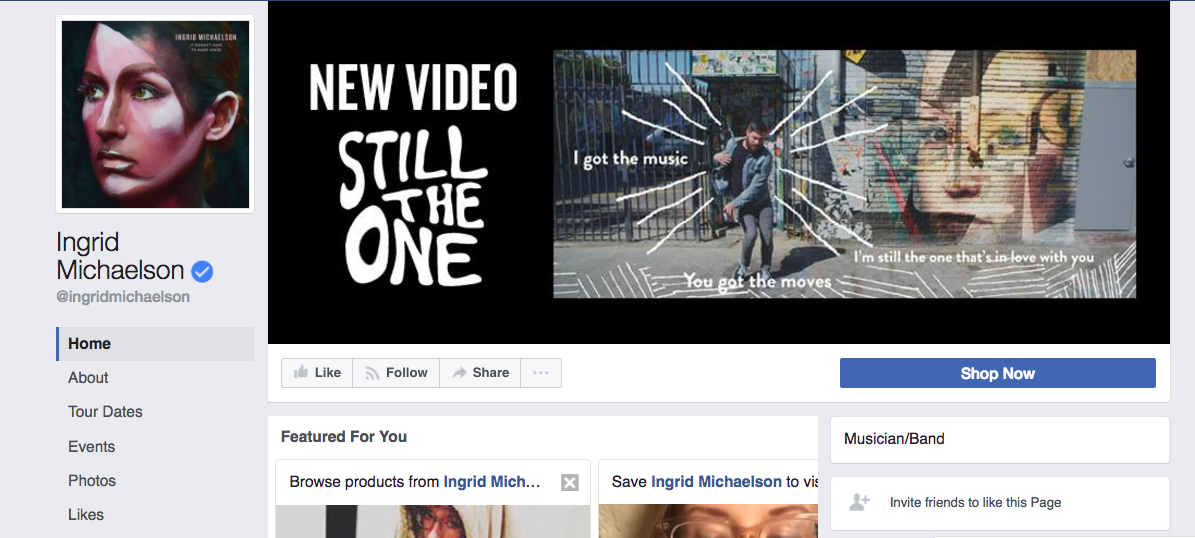
Creating a page on Facebook for your music in minutes.
Setting up a Facebook band or artist page is usually one of the first steps musicians take when establishing their digital music marketing plan, and there’s good reason for that; Facebook is the largest social network in the world.
It’s an important place to connect with fans when you have big news to announce, as well as the obvious destination for anyone you reach on the Facebook platform through paid advertising.
The growing power of Facebook: “Isn’t Facebook for… old people?”
Even as social platforms like Instagram (which is owned by Facebook) have established huge popularity among younger demographics, Facebook is still the standard for social activity between fans, musicians, and the music industry. In fact, Facebook has become so important, many music fans and industry pros would find it strange if they couldn’t find an artist on Facebook.
There are more than two BILLION active users on Facebook every month. That’s more than a quarter of the entire world’s population. Even your 13-year-old nephew who pretends he’s not on Facebook has an account to check up on things every few days.
Never before have you had such wide and instant access to the world. And that’s worth something, to both you AND Facebook.
Doesn’t Facebook want me to pay to reach my fans?
Yes, it’s true that Facebook has made it increasingly difficult for you to reach your following on their platform through organic (unpaid) means.
I would argue that it’s still important to establish and maintain a Facebook presence for your music though, because when you have big news to announce — a new album, a crowdfunding campaign, a tour, a video launch — Facebook is THE place online where the bulk of your fans are likely to be hanging out. For those big news announcements, it’s worth spending some promotion dollars to make sure you reach your Facebook followers.
Plus…
Facebook is an ideal environment to find new fans online.
Facebook’s ad platform gives you an unprecedented ability to:
- target the right audiences
- serve up compelling content (like a great music video) according to when each individual user is most likely to see it
- measure viewer engagement
- follow up with messages to anyone that showed a certain level of interest in previous ad content
- advertise to audiences who’ve visited your website, sales pages, Show.co campaigns, and more (via the Facebook pixel)
All of the data you collect, and all of the audiences you create through activity on the ad platform can live on as dynamic assets that continue working for you over many years as your career, fanbase, and social advertising skills develop.
In other words, you shouldn’t think of Facebook as a place to publish an endless string of one-offs, but a place to build upon previous efforts.
Organic reach is still (kinda-sorta) a thing
Not all effective Facebook communication is done through promoted posts and paid ads though. It’s still possible to have a piece of content extend its reach based on its own merit (or the merit Facebook’s algorithm deems it to have based on engagement and the preferences of your followers).
Just for an anecdote about the current power of Facebook, I simultaneously posted a video to Facebook AND YouTube. By the end of the first day, with no paid promotion, the video had seen way more engagement on Facebook than on YouTube. The video had as many likes, comments, and shares on Facebook as there were total views on YouTube, to say nothing of the total view count for the video on Facebook (which admittedly is unreliable, since it tallies muted videos that auto-play in your Facebook feed).
Long story short, every once in a while you can still get some serious attention from your Facebook audience without opening your wallet. And the more you use features like Facebook Live (the live-streaming tool that Facebook favors in the news feed), the more you’ll condition your fans to take notice, teaching Facebook that those followers want to see your posts… organically.
If you’re an intermediate or advanced Facebook user, you could even dive into the world of Messenger (Facebook’s associated messaging platform), where you’ll see subscribers opening and clicking messages at a much higher rate than with email.
Getting started on Facebook
Creating and maintaining a Facebook music page isn’t difficult, but there are some common misconceptions that can cause issues down the line. Follow the steps below and you’ll be just fine.
Facebook profile vs. Facebook page
First we need to clear up a little terminology. Facebook has two kinds of profiles:
- “Profiles” — or personal profiles — are for individuals that want to communicate with friends and family.
- “Pages” are profiles created by brands, products, organizations, musicians, or bands that want to reach and build an audience.
It can be confusing as the two look similar to users that aren’t super familiar with Facebook, but there are some big distinctions in how they work — which I’ll outline below. Also, you must have a personal profile on Facebook before you can create a page, so if you’re brand new to Facebook, you’ll have to create that first.
Why not just promote my music using my personal profile on Facebook?
There are some key functionality differences that make a Facebook page a better option for promoting your music.
But the #1 benefit of using a page instead of a profile has to be the security of your personal information. Most people use their personal profiles as a way to share info, pictures, and updates with friends and family. If you’re ONLY using a personal profile, certain aspects of your life outside of music will be visible to all your “friends” to see. If you grant a fan access to your personal profile, they’re now a “friend,” and they’ll see all your pictures and updates. That might be too much personal information to grant your average fan.
Making a Facebook page for your music career allows anyone to be a fan without you worrying they’re getting to know a little too much about you.
Why a Facebook page is better than a profile for music promotion
Okay, now let me highlight some of the features that make a page beneficial to your music promotion efforts:
- Anyone can see your content – With a Facebook page, all Facebook users can go to your artist page and see your content, listen to your music, watch your videos, etc. They do not have to be a fan or have your approval. This makes it easier for your content to be shared with other Facebook users.
- Fans, not friends – An artist page gives anyone on Facebook the ability to become a fan — by “liking” your page. This means they can choose to see your content in their news feed without having to get your approval. This is ideal for music fans AND for you (you don’t want to have to manually approve friend-requests from every single person that wants to hear what’s happening in your music career, right?)
- Multiple Admins – This feature is a must for bands, and helpful for the solo artist as well. It allows everyone designated with “admin status” to post from the page (and create events) as the band or artist. Admins also have the ability to make changes to the page details. The more popular your band gets, the more engagement you’ll see on Facebook — and that means you’re going to be spending more time interacting with your fans on that platform. If you can divvy up the Facebook responsibilities between several band members, awesome! Also, if you’re a solo artist, you can have a manager, trusted friend, or partner help out with the Facebook duties in those moments when it’s more difficult to stay on top of responding to comments (like when you’re on tour).
- Facebook ads – Facebook gives you quite a few ways to reach fans through their advertising tools. You can run an ad campaign designed to increase the number of fans who like your band page, though at this point “likes” tend to be a vanity metric. Better to advertise with a video served to new audiences, or followup with audiences who’ve engaged with your content already in order to drive a specific conversion campaign (email signups, Messenger subscribers, etc.), sell CDs or merch, announce a new single, or get traffic to your official website where people can find out more about your music. You can boost a post or video right from your page to ensure that more of your audience sees it, but you’ll find the best results by using Facebook’s powerful Ads Manager (in conjunction with Business Manager). Once you dive into that realm, that options are nearly limitless.
- Page Insights – Also known as analytics, this section of the Facebook page gives you all the info you need to improve your Facebook marketing efforts by showing you info such as the reach of your posts, audience engagement, and a full demographic breakdown of your fans and page visitors.
- Set Your Own URL – You can also set the URL for your Facebook page. This makes it easier to remember — something like http://facebook.com/YOUR-BAND-NAME. Just go to http://facebook.com/username to create the URL for your page.
Alright. You’re convinced. You want to set up a Facebook page, and you’re already up and running with a personal profile. Here is how you can create a band page.
How to create your Facebook artist/band page
- Go to this link https://www.facebook.com/pages/creation/
- Choose the kind of page you’d like to set up (Community/Public Figure, or Business/Brand)
- Whichever one you choose, you’ll be able to select “Musician/Band” from the Category
- After that, name your page (use your artist or band name, of course!) and agree to the Terms of Service
Now that you Facebook band page is created, be sure to post a profile image and a cover photo (which is also sometimes known as the header image).
Use your cover image and a button to highlight your most urgent call-to-action
Hard truth: your followers aren’t going to visit your Facebook page.
They’ll see your content in their news feeds (if you’re lucky, smart, or paying). NEW fans who might have discovered you through a paid ad are the most likely people to visit your Facebook Page… ONE TIME.
That’s why you need to capture their attention right away, right at the top of the page. They might not scroll down. So it’s crucial to put a call-to-action button right below your cover image, and then use the cover image to draw visitors’ attention to the call-to-action: which could lead a visitor to purchase a CD, contact you via Messenger, go to your website, etc.
If you use text and arrows in the image, just be sure they work with however your image displays on both mobile and desktop (and beware of strange cropping if your dimensions are off).
For bonus points: make your Facebook cover a short video!
Visual candy right at the top of your page. That’ll get ’em hooked.
Your video can be a teaser about your career, live footage, a highlight reel of music videos, whatever. Just something that gives a quick, memorable, and positive impression of your music — even when the sound is off (because it defaults to playing on mute).
Your Facebook cover video should be:
- at least 20 seconds long, and no more than 90 seconds
- around 820 x 462 pixels.
IMPORTANT: Facebook changes its recommended dimensions for various images on its platform pretty often, so just double check before you take my word for it.
Getting to know you. Getting to know all ABOUT you.
Also be sure to drop your bio into the ABOUT section. It doesn’t need to be formal. On social platforms, first-person and personal works best.
Next, populate any of the relevant fields with info about your music career, contact info, band members, etc.
Note: a Facebook page always displays more info for anyone with admin status. It’s easy to get confused, but your fans will not see the stats and admin links that can show up on your page when you are viewing it as an admin.
Selling your music on Facebook
Once you’ve set up your artist/band Page on Facebook, you can be selling your music in minutes. There’s an easy way to create a Facebook Shop and integrate it with your CD Baby store — so fans can purchase music via Facebook, CD Baby will handle the order fulfillment, and you don’t have to worry about trips to the post office!
Go HERE for instructions on how to integrate a Facebook Shop with CD Baby.
Also, check out the following articles for more information on using a Facebook page to promote your music:
1. Facebook advertising for musicians
2. How to use Facebook events to get people to your shows
3. “No matter what you think about Facebook, you have to market your music there”
4. Five ways to raise your band’s Facebook page from the dead
5. If you only have $100 to spend on marketing your music, here’s what to do!
6. How to make sure your fans see your content on Facebook
7. Seven deadly sins musicians are committing on Facebook and Twitter
8. Facebook for musicians: to post, or not to post?
9. Ten reasons why you’re losing your Facebook fans
10. This is how you should use Facebook Live to get results
Do you have a tip for new artists on Facebook? Please share in the comments below!
[hana-code-insert name=’FB-Music-Master’ /]
Chris Robley is an acclaimed singer-songwriter and award-winning poet from Maine.
His Beatlesque indie-pop and milltown Americana songs have been praised by The Associated Press, No Depression, KCRW, The LA Times, Boston Globe, NPR, American Songwriter, and others.
His poems have appeared in Poetry Magazine, Prairie Schooner, The Poetry Review, and more.
Robley has received a Maine Literary Award in Poetry, Boulevard’s Emerging Writers Prize for Poetry, and in 2016 was selected by former US-poet laureate Robert Pinsky as a finalist for the Dorset Prize.